

The Fastest Way to Keyword for Adobe Stock
Auto-generate titles, descriptions, keywords & categories. Export Adobe Stock-ready CSV in one click.
Available for Windows, macOS, and Linux


Built for Adobe Stock Contributors
Adobe Stock CSV Format
Export directly in Adobe Stock's exact CSV format. No reformatting, no manual tweaks. Upload straight to the portal.
Auto-fill Categories
Stop guessing Adobe Stock categories. Meita's AI automatically analyzes your image and selects the perfect official category ID.
Avoid IP Rejections
Our double filter (AI + Database) catches brand names and IP that get you banned on Adobe before you even export.
Keyword Limit Compliance
Adobe Stock limits you to 49 keywords. Our AI generates the highest-converting keywords right up to the limit.
How It Works


6 images selected
Drag and drop or pick any number of images, videos or vectors.
Ready to try it?
No credit card required · 5 free generations included
Speed Up Your Workflow
Before Meita
Manually typing 49 keywords per image + selecting categories
for 200 images
After Meita
Bulk dropping images and letting AI generate everything
for 200 images
Double Safety Filter
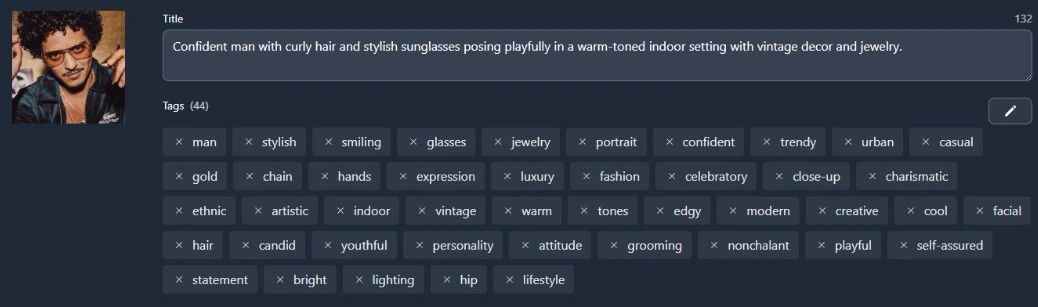
See brand names and IP get caught in real-time. Adobe Stock has strict policies — our AI + database double filter keeps your account safe.
"Hundreds of images get complete metadata in a short time. Finding keywords and compiling titles manually takes a huge amount of time, and sometimes we run out of ideas. Thanks to this app we don't need to do that manually anymore!"
Frequently Asked Questions
What CSV format does Meita export for Adobe Stock?
Meita exports directly in Adobe Stock's official CSV format — including filename, title, keywords, and category fields. No reformatting needed.
Does it auto-select Adobe Stock categories?
Yes. The AI analyzes your image and selects the most appropriate official Adobe Stock category ID automatically.
How does the keyword limit work?
Adobe Stock allows a maximum of 49 keywords per image. Meita generates the highest-relevance keywords right up to that limit.
Will it catch brand names that could get me rejected?
Yes. Our AI + database double filter automatically detects and removes brand names, celebrity likenesses, and trademarked elements from your metadata.
What image formats are supported?
Meita works with JPG, PNG, BMP, SVG, EPS, WebP, and more. It also supports video formats like MP4, AVI, and MOV.
Upload to Adobe Stock 10x Faster
Adobe Stock CSV export built-in · Windows, macOS & Linux
No credit card required · Your images never leave your machine